Virtual Associate
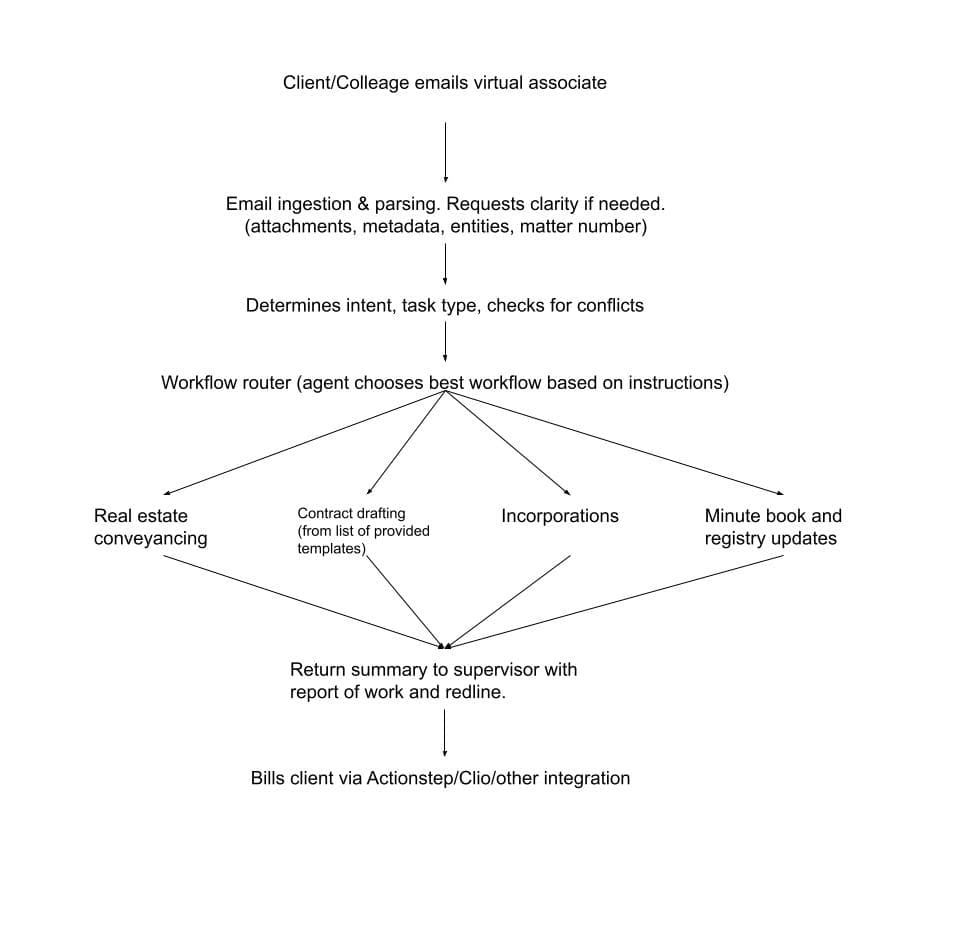
The idea behind Virtual Associate is simple: a lawyer sends a request — by text, email, or chat — and the system handles the full workflow, from research and drafting through filing and delivery, pausing for approval when it matters.
Why we want to build this
Most legal automation stops at templates or chatbot suggestions. A real legal task — an incorporation, a closing, a compliance review — involves a dozen steps across different systems, and dropping any one of them means starting over or missing a deadline.
Virtual Associate would handle those chains: take an instruction, run the steps in order, call the right tools at each stage, and bring the lawyer in only when judgment or approval is needed. That is the gap between current AI assistants and something a firm can actually rely on.
How a request would flow
- 01
Goal and context
A lawyer sends an objective, constraints, and source material by message, email, or a task trigger.
- 02
Planning
The system selects the right workflow, builds a step-by-step plan, and asks for anything missing before starting.
- 03
Execution with checkpoints
Steps run across drafting, filing, knowledge bases, and communication tools. High-stakes actions pause for lawyer approval before proceeding.
What we are designing for
Full workflow execution
Each tool runs as a complete sequence — intake, data checks, drafting, filing, delivery — instead of stopping at a single step.
Multi-step planning and recovery
The system breaks a request into ordered steps, calls tools in sequence, and handles failures by retrying or asking for clarification.
Building on what already works
The architecture extends patterns proven in Mike and Cleardeal — matter folder access, document generation, approval gates — into a general execution layer.
Access from wherever you work
Lawyers would trigger, monitor, and approve workflows from their phone or desktop through email, iMessage, WhatsApp, or text.
Safeguards by design
- Human approval gates before filings, signatures, fund movements, and external sends.
- Execution logs showing what was done, why, and which sources were used at each step.
- Policy checks for conflicts, missing data, and out-of-scope requests before work begins.
- Matter-scoped access so sensitive data stays segmented between clients and teams.
Expected outcomes
- Faster turnaround on repetitive but high-stakes legal workflows like incorporations and closings.
- More consistency across documents, communications, and process steps.
- Less back-and-forth between lawyers, assistants, and back-office tools.
- A path to handling more matters without adding proportional headcount.